AI can read a webpage more accurately when the words people see and the code underneath the page describe the same thing. The visible page answers the question. A code format called JSON-LD repeats the title, topic, author, dates, and web address so AI does not have to guess what the page is about.
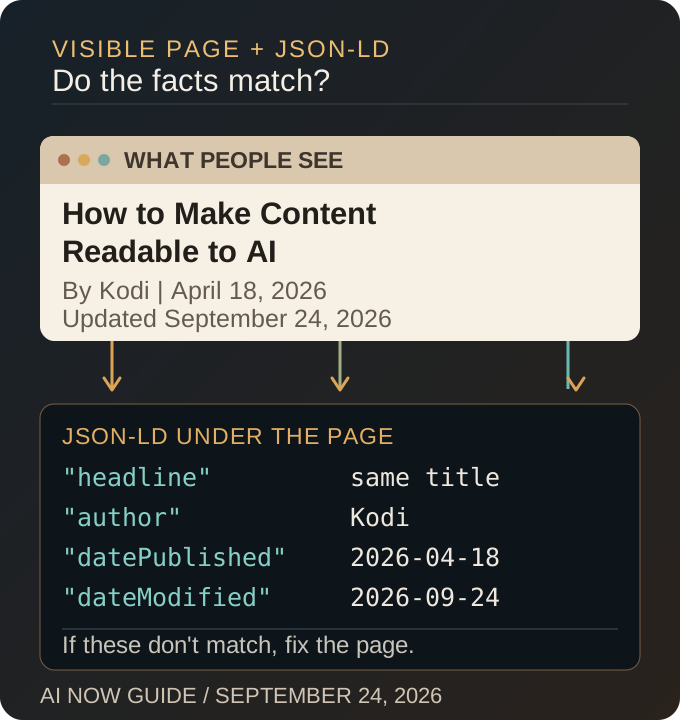
On this page, the headline tells AI exactly what the guide covers: how to make content readable to AI. The JSON-LD example below repeats that headline and the page details. If we change the headline, author, date, or URL, we change the code too.
What Makes Content Readable to AI?
Start with a direct answer written for a person. Name the topic clearly. Use headings that say what each section explains. Support important claims with dates, examples, or links that a reader can check.
This is often called machine-readable content. The technical name matters, but the job is simple: make the page easy for AI to identify, understand, and connect to the right topic without hiding the answer behind vague language.
What Should the Code Tell AI?
The JSON-LD should identify the same page a person sees. For an article, that usually includes the headline, author, first publication date, last update, topic, and web address. Here is a small piece of code from this page:
{
  "@id": "https://www.ainowguide.com/article/ai-now-guide-machine-readable-content/#article",
  "@type": "Article",
  "headline": "How to Make Content Readable to AI",
  "datePublished": "2026-04-18",
  "dateModified": "2026-09-24",
  "author": {
    "@id": "https://www.ainowguide.com/#kodi"
  },
  "mainEntityOfPage": {
    "@id": "https://www.ainowguide.com/article/ai-now-guide-machine-readable-content/#webpage"
  }
}
This code does not replace the article. It labels the article. If the label says one thing and the visible page says another, AI has to decide which version to trust.
How Does AI Now Guide Keep the Page and Code Together?
AI Now Guide stores each article in one JSON file. That record supplies the visible headline, author, dates, category, and body copy. The same record also supplies the JSON-LD. One source reduces the chance that the page and its code drift apart.
A shared source still needs testing. A template error can repeat the wrong title or leave an old URL in the code. That is why we check the live page after a change instead of trusting the saved file.
How Do You Test the Page AI Can Read?
Open the live page and read the first two sentences. They should answer the headline. Check that the H1 names the subject and each H2 explains the section below it. Then compare the visible title, author, dates, and URL with the JSON-LD in the rendered page.
For a full website, test every published URL rather than checking only the homepage. Our structured data audit explains that review from the saved article to the live page.
What Does the 102-Page Report Check?
AI Now Guide publishes a rendered-page report for every URL in its sitemap. On September 24, the report checked 102 live pages. All 102 contained the required catalog data, and none failed the test.
The report proves that the required data appeared in the pages served by the website. It does not grade the writing, prove that an AI assistant used a page, or promise search traffic. Those results need their own evidence.
Start with one page. Give people the answer they came for, give AI matching facts in JSON-LD, and check the version your website actually serves. To learn how an AI tool may reach that page, read how AI discovers content.